How to use Ghuri
Search anywhere in Bangladesh and find out what is there, what the weather will do for the next ten days, how people actually travel there, and where to stay. Free, no account, works on any phone or computer.
বাংলাদেশের যেকোনো জায়গা খুঁজুন — সেখানে কী আছে, আগামী দশ দিনের আবহাওয়া, কীভাবে যাবেন আর কোথায় থাকবেন। বিনামূল্যে, কোনো অ্যাকাউন্ট লাগে না।
Open Ghuri →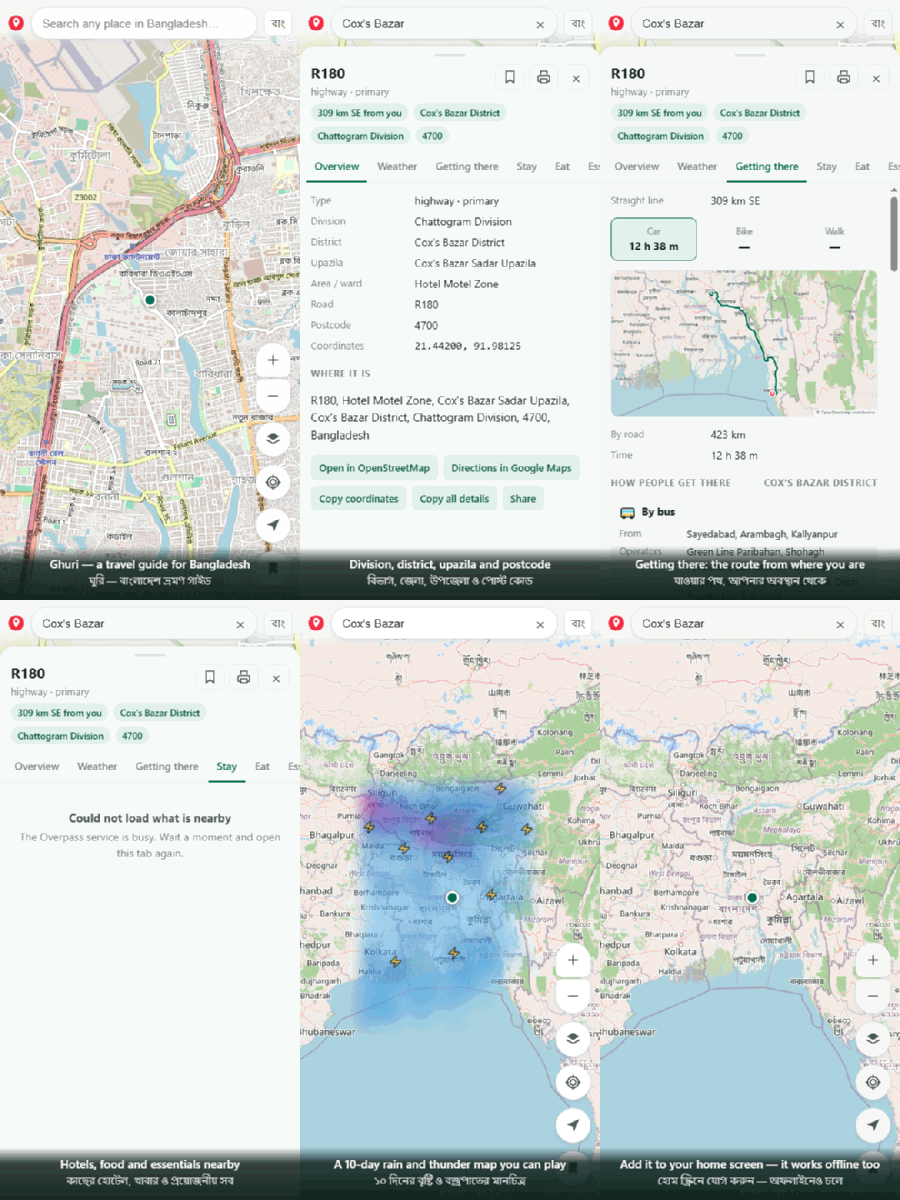
-
Search a place
Type any district, upazila, town or landmark. Old and new spellings both work — Chittagong or Chattogram, Jessore or Jashore.
যেকোনো জেলা, উপজেলা বা জায়গার নাম লিখুন। পুরনো ও নতুন দুই বানানেই কাজ করে।
-
Or just tap the map
Tap anywhere and it tells you the division, district, upazila, road and postcode for that exact point.
মানচিত্রে চাপ দিলেই বিভাগ, জেলা, উপজেলা, রাস্তা ও পোস্ট কোড দেখাবে।
-
Check the weather first
Ten days ahead, with a rain chart showing which days will be wet and an hour-by-hour strip for the next two days. In monsoon it warns you.
দশ দিনের পূর্বাভাস, কোন দিন বৃষ্টি হবে তার চার্টসহ। বর্ষায় সতর্কবার্তা দেয়।
-
See how to get there
A picture of the route with distance and time, plus the bus companies, named trains, airlines and launches that serve that district — and which Dhaka terminal to leave from.
পথের ছবি, দূরত্ব ও সময়; সঙ্গে বাস, ট্রেন, বিমান ও লঞ্চের নাম এবং ঢাকার কোন টার্মিনাল।
-
Find somewhere to stay and eat
Hotels and guest houses nearest first, then restaurants, pharmacies, hospitals, ATMs, markets and places worth seeing.
কাছের হোটেল, রেস্তোরাঁ, ফার্মেসি, হাসপাতাল, এটিএম ও দর্শনীয় স্থান।
-
Turn on the map layers
The layers button colours all 64 districts or 544 upazilas, shows the live rain radar, plays a ten-day rain and thunder forecast across the country, or switches to NASA satellite imagery.
৬৪ জেলা বা ৫৪৪ উপজেলা রঙে, বৃষ্টির রাডার, ১০ দিনের পূর্বাভাস ও স্যাটেলাইট ছবি।
-
Save, print or share it
Bookmark a place to come back to, copy everything as text, or print a one-page trip summary — useful to carry or send to whoever is travelling with you.
সংরক্ষণ করুন, টেক্সট কপি করুন, অথবা এক পাতার প্রিন্ট নিন।
Press the arrow button and it tracks your position, shows your speed and direction, and keeps the screen awake so the map does not blank on a long bus journey.
Operator names are a guide to who usually runs a route. Departure times, fares and whether a service is running today are not in the app, because those change constantly. Ring the counter before you set out.
Put it on your phone
Android
- Open bd-ghuri-guide.pages.dev in Chrome
- Tap the three dots at the top right
- Tap Add to Home screen or Install app
- Open it from the new icon — no address bar
iPhone
- Open the address in Safari (not Chrome)
- Tap the Share button at the bottom
- Scroll and tap Add to Home Screen
- Open it from the new icon
Once installed, searching every district and upazila, the transport operator list, the coloured boundaries and anywhere you already looked at all still work with no internet. A live forecast and a new area's hotels do need a connection.